Showing posts with label D2. Show all posts

Wednesday, 5 January 2011

Main Shoot- Part Two

As I stated in the post before we were asked to choose six photographs which are all thematic with each other. I decided to go with the theme of Rivers (River Trent) I decided to split my photoshoot into two parts. I did this to show the same area which I chose to photograph in two completely different climates. Luckily we had a massive downfall of snow so I thought this was the perfect time to go down for my second part of the photoshoot. My original plan was to go down when it was dark and gloomy with rainfall, but it decided to snow instead so this was a better opportunity for some amazing pictures.

Again, like before safety was top priority and it was even more dangerous this time as when I went down it was still snowing quite heavy so I had to be extra careful this time. Again for this I took a spare battery with me just incase I ran out of battery. I also took my tri-pod with me aswell although it was quite hard to use with the weather conditions. Below are my favourite pictures which I feel go well with my theme. I have also described what settings I have used and why I have used them for the shot.

1/320, F-Stop 7.1, ISO 400
This is the first photograph I have decided to choose for my second part of the shoot. I have decided to choose this photograph because it has a great comparison with the third photograph I chose for the first photoshoot. This is great because it shows the same area but with a completely different climate which intern makes it a completely different photograph all together. On the other hand I have also chosen this photograph because it fits in very well with my theme. I managed to get a nice clear view of the river in the middle with a great surrounding landscape. I managed to position the camera perfectly to get the tree into focus alongside a clear view of the houses deep into the background. At first I chose to have the shutter speed set to 1/200 and the F-Stop set to 4.0. These settings that I initially chose were not right for the shot though. I found that after I had taken a few practice shots the photograph was appearing very bright, way too bright in fact. So I changed them to the settings labelled above. As you can see using these settings were perfect as I managed to get the right brightness alongside the right colour for the shot.

1/250, F-Stop 7.1 ISO 400

This is the second photograph I have chosen. When I was in the area for where my photoshoot was to take place I took a look around the area first to see if I could see anything different from my other photographs but still have my theme involved into the picture. I came across ten trees together next to each other with the River in front of them so this opportunity couldn't go a miss. I decided to take a few practice shots to begin with to find out what the final picture would look like. I did this to test out wether it was a good idea to shoot these trees or wether the photographs were a waste of time. At first I thought that it was a brilliant idea after viewing the first shot. I had my F-Stop set to 11. Obviously having this set to what it was made the background very visable. I was going to keep it as this setting but I wanted the viewer to mainly focus on the trees and River rather than looking at the deep background so I decided to change the F-Stop to 7.1. This made the background a little bit more out of focus but not too much so that it is completely out of focus.

My shutter speed was set to 1/250 to get the right amount of brightness. It was set to a little bit lower than the previous picture because it had stopped snowing as much and the light had dimmed a tiny little bit. At first I tried to use my Tri-Pod for this picture but I was really struggling to use it because of the snow on the ground, a few times it nearly fell over so I decided not to use it in the end and just hold the camera myself. Overall I am very happy with this picture because I fell that I have succeeded in what I wanted to do with this shot which was to make the viewer be automatically focused onto the trees and River.

1/200, F-Stop 10, ISO 400
This is my final photograph that I have decided to choose. This photograph that I took was right next to where I took the first one and was one of the last photographs I took on the shoot. The snow was starting to come down even heavier so I decided to go back to the original area of my photoshoot. This was again a very dangerous shot as I was right next to the river and could not see if there was any faults with the bank which made the shot even riskier so I took extra precautions when taking the shot. I wanted this shot to have everything in it. I wanted the river to be in full focus and look very sharp and I also wanted the background to be in focus aswell. This is why I chose to take the shot with an F-Stop of 10 because as you can see the background is in focus which adds extra detail to the shot. I decided to take a shot like this because my other shots were taken at an F-Stop that makes the background quite blurred out to make the viewer focus purely on the River and the near surroundings. Again, like before I did a couple of practice shots to make sure that I had a choice when choosing my final shot for this task. I tried a few more shots with a lower F-stop to see what the background looked like a bit blurred out but I decided not to go with that idea for this shot. I had to have my shutter speed set to 1/200 because it was getting duller by the moment when I was getting nearer to the end of my shoot so I had to let a little bit more light in but not too much because the snow was brightening up the shots anyway. What I also lie about this shot is the big stone piece with foliage growing on it in the middle of the shot. I feel that this goes very well where I have chosen to take the shot as it adds perfectly to the shot so the viewer will also be drawn to looking at this aswell as the main river itself. I also took this shot because there was a slope in the river just to the right of the shot which was creating a crashing effect at the bottom of the slope. Overall I am very happy with this shot that I have taken as it includes a bit of everything. The main piece it includes though is my theme which is the river which I have managed to add more too by taking this shot with the  river and the slope in it.


Main Shoot- Part One

The aim for this whole unit is to show that I can use my camera on manual settings. By this I mean that I can show I understand how to use shutter speeds with depth of field to take photographs with the correct light and colour. As I stated earlier on in my blog my theme is Rivers and what surround them. I decided to go down to the River Trent for my first part of the photo shoot. In this blog I will be showing some of my favourite pictures that I have taken and talk a little bit about what settings I had the camera set to and why I have chosen them. After this I will be going out again and choosing three more pictures and talking about them. In a previous blog I have talked about precautions I have taken for this task because it can be quite dangerous due to there being a River as the main subject.

The time was around twelve o clock ish, so I had some good light to take my photographs. I went to a place called the Washlands where the main river (River Trent) was situated.

1/320, F-Stop 7.1, ISO 400            


This is the first image I have chosen. Whilst looking through my images from the photo shoot this was one of the main ones that caught my eye. I managed to get the right light settings with a perfect picture of the river flowing. I also managed to get some nice surroundings in the background as well but the main focus is the River. I took a few shots exactly the same but used different settings. These settings that are labelled above were the ones that made the image look it's best. The shutter speed was set 1/320 due to how much light there was at the time. I tried having a 1/200 and 1/250 shutter speed but the pictures were way too bright. My main focus for the photograph was to have the picture bright but not too bright so even if I had a  slightly faster shutter speed the photograph would still have looked very good. I managed to time the shot purley out of luck to capture a bird flying past. Like I said this was pureley luck at the time I was taking the shots but it makes the image look even better. For this shot I also used my Tri-Pod. I used the Tri-Pod because I wanted this picture to be perfect and not tilted or blurred. I think that overall this photograph relates to my theme very well and the settings that I chose alongside exposure to light were perfect for the shot.

1/125, F Stop 6.3, ISO 400
This is the second photograph I have chosen. After many previous photographs I decided to go along the River a little bit to see if I could find any more different spots to take some nice photographs. I decided to try something a little different rather than just take a straight shot of the River. This was a complete bank shot as I didn't know what it would turn out like but I was quite surprised at the results. After looking through the shots of this area this was the one that I found stood out from the rest of them. I decided to go with the picture within a picture frame. I have lined up the two trees to create a frame with the river being the main subject in the centre. I decided to use a slower shutter speed for this picture because where I was standing there wasn't very much light so by using a slower shutter speed it brightened up the picture alot. I took two pictures of the same subject. The first photograph I took I used the flash so I could see the trees with all there colour. The second photograph I took was the one above without the flash. At first I was going to use the first picture I took with the flash but I decided that I liked the dark tree effect more because it makes the main subject (River) stand out a lot more. Again for this picutre I used my Tri-Pod so the image was completely stable. I feel that this image has turned out quite nice with the right exposure to light. I managed to get a nice reflection of the clouds and the sky from the river as well which stands out a lot more due the boldness of the trees.


1/320, F-Stop 7.1, ISO 400
This is the third photograph I have chosen as one of my favourites from the photo shoot. I had to take extra care when taking this shot as I was quite close to the river and there was a good chance of falling in if I had got any closer to the edge of the bank. I decided to choose this picture for my assaignment because it is what I like to call an all rounder. By this I mean it has a bit of everything in the shot alongside a nice colour set with the perfect brightness. The sun was just coming out when I was taking this shot so the original photograph I took didn't look that great because I had my camera set for the sun being cloudy with lowered light. So i increased the shutter speed from 1/200 to 1/320 to increase the speed of the shot and letting less light into it therefore getting a perfect picture with the right amount of brightness. At first I tried this shot with the tri-pod to see how it would go but I was worried that it might fall into the river and the practise shots I took didnt look great either so I decided not to use the tri-pod for this shot. My F-Stop was set to 7.1 with an ISO of 400 this enabled me to get the perfect sharpness for the picture with no blur what so ever. If I was to take this shot again I woujld proberbly try and not get the edge of the bank into the shot in the right hand corner of the shot. I would proberbly change a few settings on the camera aswell although this would not make much different to the current shot to make it better.

So these were the first three pictures that I have chosen and whhy I have chosen them. I think they are quite beautiful pictures of the River Trent and the surroundings of the River and it falls nicely into my theme which is Rivers. In my next photoshoot I will be returning to the same area but when the climate is alot different so there is a completely different feel to the photographs. This will be because of brightness and weather conditions.

Wednesday, 15 December 2010

Research- Joseph Squillante

I have been browsing the internet for sometime now looking for different photographers that I feel inspire me and some that I feel that are unusual types of photography. Now I am going to concentrate on photographers that relate to my theme which I think are really good.

The first photographer thats work I feel is brilliant is called Joseph Squillante. Joseph Squillante is a River photographer. He owns his own company that proffesionally take photographs of a certain River. The River is called Hudson River. The Hudson River is a 315 mile River that runs North to South through eastern New York, so there is plenty of opportunity to take many different photographs. Through this research I will be choosing the photographs that I think look great for the type of photography he does and why I like them.

Highlands Nook

I thought that I would start off with my favourite picture first because its one that I can relate to in my photoshoot. As I was looking through Joseph's Hudson River photos I came across this fantastic shot. The picture is of part of the Hudson River whilst looking through the trees and shrubury to create an amazin picture within a picture effect. The reason I chose this picture is because it relates to one of my picutres I have taken for the main task. I had also taken a shot very similar to this so I had to make this one of my favourites. He has also made the photo black and white to make the photo have a sort of winterey look but not too strong which I feel was the right decision.


Lake Colden and Avalanche Pass
The second photograph I have chosen is also one of my favourites. This photogrpah shows that even simplicty can even have great rewards. This photograph is a straight shot of the River with the landscape surrounding it. Theres nothing jumping out naking this picture different but just the picutre in itself is amazing thats for sure. Joseph has been taking pictures of the Hudson River for many years now and most of his pictures like this are stunning. Again he has also made this picture black and white to add an additional winter effect due to the time of year it was taken (December). He has also managed to get a nice reflection of the River with landscape and clouds being the main reflections. Like I said simple but fantstic.

Lake Tear of the Clouds
The third and final photograph I have chosen is another photograph that looks absolutely fantastic. Again this photograph is of the river with the surrounding landscape. What I like about this picture though is that he managed to take the shot when it was misty. As you can see towards the back of the photograph near the tops of the trees there is a lot of mist which makes this picture unique to the others. I don't think I would have chosen this photograph if it wasnt for that because it makes the picture stand out more. This photograph was taken in 1983, again it looks to be in the winter period of the year which also makes the black and white desaturation look suitable.

Wednesday, 8 December 2010

Research- Tom Lowe

Moving away from water photography, I have decided to choose a photographer thats work is quite unbelievable. Tom Lowe's photography ranges from landscape photography to astronomy photography. It's his astronomy photography that inspires me the most.

Thomas is currently a student at the Brooks Institute of photography based in California. He shoots a number of different types of photography. He states that photography is great because there in no limit that one can achieve with a camera.

Like I have stated earlier in this blog it is his astronomy photography that inspires me. When I say astronomy photography I mean pictures of the galaxy and night sky taken from the ground.

Blazing Bristlecone, Tom Lowe
Blazing Bristlecone
This is my favourite image that actually made me want to research Tom Lowe. The Blazing Bristlecone shot is a picture of the night sky which quite obviously on a very clear night. The picture shows many of the galaxies stars and even the milky way. This photograph is absolutely stunning and it also won an award for an earth and space photography competition. I like the way he has managed to get the lighting perfect. I know that because it's dark and the night sky is bright that it was going to be easy to get the light right but the way that Tom has the light is just perfect for the shot. He manages to get the background trees looking like shadow and the tree at the front of the shot in a dark light. This enables the viewer to be more drawn to the night sky with the background still looking magnificent.


Ancient Sky

This is also one of Tom Lowe's awsome photographs. Again he has taken a picture of the night sky with trees in the foreground. The colour and lighting in this photograph in this photograph again are faultless. The way he has done it is that so you concentrate on the background (Night Sky) whilst still making the foreground look perfect.


Milky Way Behind Sierras Lake

The finla picture I have chosen from Tom Lowe's work is again a photograph of the night sky in all it's beauty. With the stars and the milky way easily visible Tom has managed to create a perfect photograph. He has also managed to get the reflection of the stars from the lake to create an even better photograph. As you can see when Tom does this type of photography he likes to have something in the foreground instead of taking a picture directly up into the night sky. This is brilliant as he manages to get different types of objects and landscapes into the shot. Even though they look like a shadow because of it being night time they fit perfectly into the photograph because of all the natural colours from the night sky.

So in conclusion I feel that Toms work is fantastic, showing off what is all around us and even adds our landscape around us from earth into his photographs making them look perfect to blend in with the night sky and galaxy.

Research- Wayne Levin

For my next installment to the research area, I am going to be researching a photographer who is called Wayne Levin. Wayne Levin is also an underwater photographer, but he takes his photography to the next level. By this I mean he will take photographs which look beautiful as they are and then he may edit them to add that extra effect to finish the image off.

Wayne Levin doesn't just concentrate on underwater photography he also photographs divers, swimmers and surfers aswell. This is why I wanted to research him because he has a wide spread variety of water photography which is just what I am looking for.

Surfer with Ancient Board
After taking a look through Levins work I thought I would start off with something a little bit different rather than go straight into his underwater photography. As I mentioned before Levin also likes to take pictures of surfers. This picture that I found was in my opinion one of my favourite surfer pictures he has done. He has captured the image perfectly and created the black and white effect to make the image ook old and to make it look like he is using and ancient board. The way this image was taken is absolutely brilliant, with perfect black and white colour and brightness I don't think he could've taken a better shot.

This is the second image that I found from Levins work. This picture is a fantastic shot of a shark swimming close to the camera with two other sharks in the background. Like I have said in my previous research when doing underwater photography you don't have to concentrate on getting pictures picture perfect but Wayne manages to get the perfect shot. Again here he has desaturated the image which creates an amazing effect. With the sunlight shining through the water onto the sharks, making this picture black and white suits it one hundred percent.

Wednesday, 24 November 2010

Photoshop Task 2

For this task I was asked to use different filters on my photographs. I was also asked to use two images and merge them together using different styles. Below you will find how I managed to create different filters and apply them onto my photograph.

Firstly though, I will be describing how I took two different pictures and merged them into one using different photoshop tools.

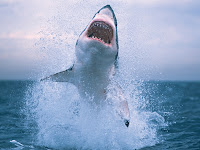


These were the two original images that I wanted to use. I wanted to take the shark out of the right picture and then place him into the other picture, so it looks like it's diving out of the river.


Firstly I used the magnetic lasso tool on photoshop and drew a line around what I wanted to cut out of the picture. After this had been done it selected what I have drawn as shown above. After I had done this I was able to move the picture that I had selected onto the other one just by clicking it and then dragging it onto where abouts I wanted it on the other photograph.


Ok, so this is what the picture looks like after it has been moved over from its original source onto it's new one. As you can see there is a lot of background from the pictures original source that has been brought over to the new one. So what I did was used the history brush to get rid of of all the picture detail I didn't want.


As you can see from the above picture it is already looking alot more smarter and cleaned up. I have also decreased the opacity of the image to create a more real look effect. All that will need doing now to create the perfect picture is to add more blur around the edges of the shark and change the colour around a little bit more.

For this task we were also asked to get two images and then split them up into different filters, six for each. For my first image I used my same original image from the first task. I used this photograph because I feel that has great potential to look quite good when using different filters.


So firstly what I needed to, although it is hard to see from the screenshot, was to select the area of the picture that I wanted to filter. So once this is selected I could then go into the menu and look at choosing one from many different filters. For my first filter I chose dry brush. This gives the picture a more hand drawn look.

This screenshot above shows the selected part of the image I want filtered and what it will look like. On the right hand side of the screenshot you can see that there many different filters within the filter I have selected. Because I wanted more of a hand drawn look I have selected coloured pencil. You can even change many different settings from the filter you have chosen to make the effect more stronger or weaker etc.


So as you can see from the above screenshot this is what the picture looks like so far from adding the first filter.


This is the second effect I have chosen for my image. This is a glass distortion filter. I have also chosen the ocean ripple filter within the original filter to create a drizzle effect. I weakened the effect though because it looked way too blurry originally.


This is the image after I have added the second filter. As you can see it doesnt look alot different to what it was before but it has drizzle effect when viewing the picture in full screen.


This image show the next filter that I have chosen. I decided to finish off the top half of the image with  motion blur filter. I have also made the filter alot more stronger than the original setting to make the filter more blurry.


This next filter was a filter within the filter called sketch, graphic pen. The filter is called water paper filter. I chose this filter just purely for experimental purposes just to see what it does. Above is also what the image looks like so far.


The above screenshot shows the next filter that I used. This filter is called spatter. It is found in the brush strokes filter menu. Once I had selected spatter I then selected the filter dark strokes to create this fantastic dark sketch like effect.

This is the image so far. All that the photograph needs now is the final filter.


So for the last filter, I chose the radial blur filter. This filter is another blur filter which makes a circular blur effect. It is quite a random filter but has the potential to create some awesome effects.


This is the final image after the six different filters have been applied.


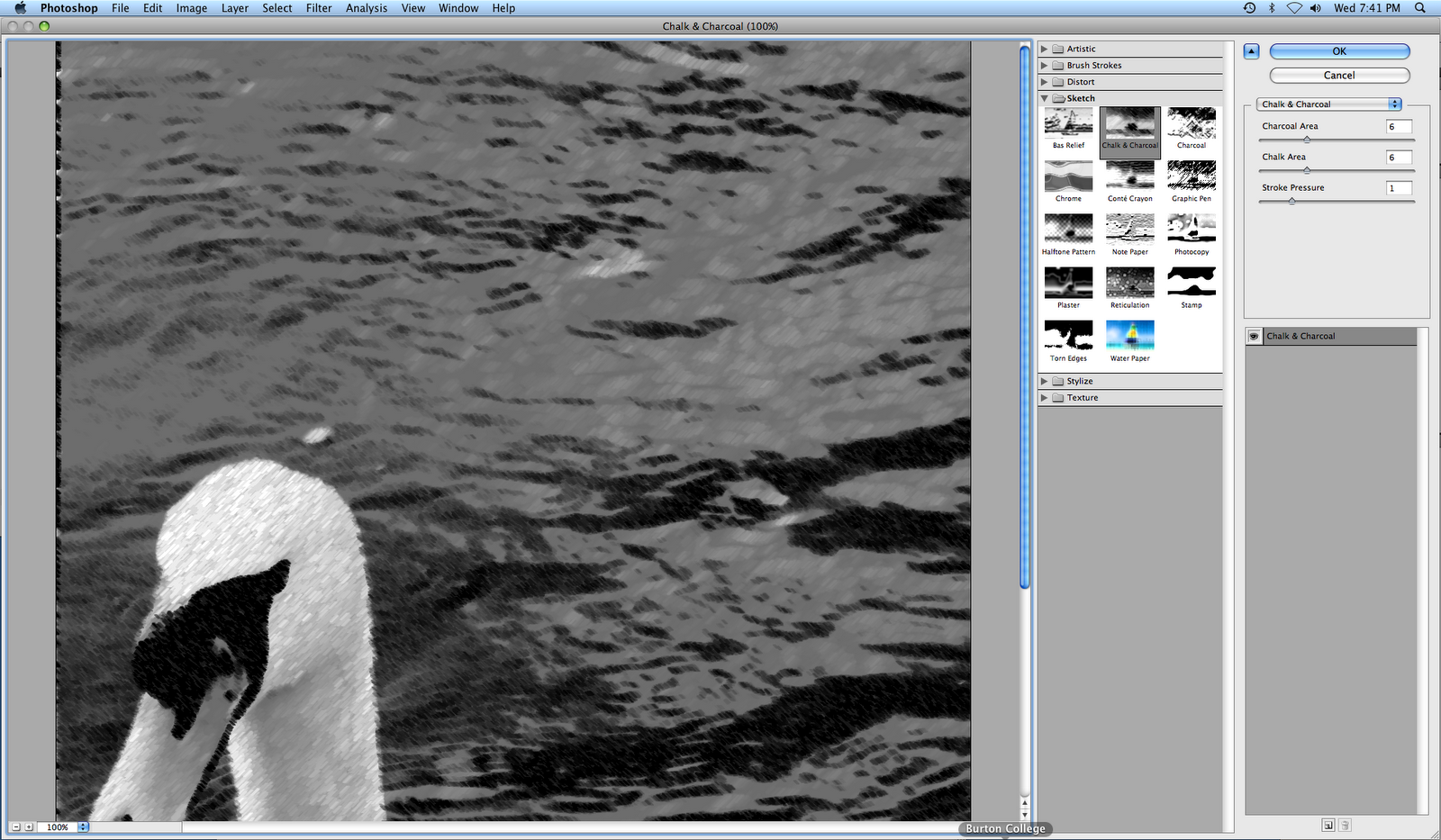
For my next picture (Shown above) I chose one of my favourites. It was a picture of a swan in the River Trent. For this picture I mainly wanted to concentrate on using different types of sketch effects.


For the first filter I chose the Bas relief filter. This filter is a heavy sketch feature which again can be modified to be weaker but it is designed to give a darker sketch effect.


This is what the image looks like after the first effect has been applied.


The second filter I decided to apply was called the chalk and charcoal filter. This filter does exactly as the name states. It gives the photograph a very nice chalky charcoal effect which when applied to a whole picture looks fantastic.


This is the photograph so far after having two filters applied to it.


This next filter I applied to my photograph was called torn edges. For this filter I had to turn down the contrast because with the contrast on it's original setting made the picture too bright so you couldn't really see anything.


This is the photograph so far after applying the third filter.


This is the fourth filter I decided to apply. This sketch filter is called note paper. I may have made this filter a bit too strong for what I am actually filtering. Due to there being water in the area I was filtering maybe I should've made the effect a little bit weaker to display the water a little bit clearer.


This is the photograph after the fourth filter has been applied.


This next filter that I have chosen is one of my favourites. This filter is called the chrome filter. It creates a fantastic chrome effect over the picture. I had to alter the detail in the filter due to it being too strong to start with. This sort of filter will look even better when it is applied to the whole of a photograph.


This is what the image looks like so far after the fifth filter has been applied.


The last filter that I chose is also another great filter. It is called the reticulation filter. This filter is a very dark sketch filter but it makes photographs look stunning. Again, this filter would look even better when applied to a whole picture not just part of one.


This is the final image after all six filters have been applied. As I have shown there are many different filters to apply to images and they all have there own settings to create many different effects.

For the final part of this task I was asked to get an image and apply text to that image. For this task I chose my picture of the swan in the River Trent that I used for the filters part of the task.

The first step is to click on the text tool which is on the left had side tool bar. I then selected horizontal text. I could then type any where on the screen.


Firstly When I typed the text onto the photograph the text was way too small so I highlighted the text then entered a text size that I wanted it to be as shown above. This text size was set to 600 Pt. This was the perfect text size for the photograph.


The above screenshot shows the different effect that i have applied to the text. This effect I used was called bulge. As you can see you can then change how strong you want the effect to be. Changing these settings will change how the text looks. You can also change the colour of the text as well but the original colour suited the my picture.

So overall there are many different effects and filters you can use on photoshop, whether you just want to improve a pictures quality of looks or completely manipulate the photograph you can do near enough anything using photoshop.


Wednesday, 17 November 2010

Research-Len Deeley

Another photographer who's work I feel is absolutely fascinating is Len Deeley. Len Deeley specialises in underwater photography. This ranges from all sorts of different types of fish to actual historical ship wrecks. Len uses all different kinds of under sea photography equipment, the camera he uses is a Nikon D70 alongside Inon Strobes.

Len began diving in 1970 and then continued to dive with many different branches to gain experience. He then began to start seriously taking underwater photography in 1980. Len used many different cameras to practise his photography.

With underwater photography you don't just need skill to take good pictures but you also need heavy training before hand because it can be very dangerous. Before you go out on a dive you need to be well prepared knowing the depth of your dive because it can be very dangerous diving too deep due to air pressure etc.

Amphiprion Percula
When I was researching Len Deeleys work I came across this photograph which in my opinion is quite phenomenal. It is a picture of three clown fish in some sort of circular area. This photograph is brilliant as   everything about it is perfect. I particularly like the surrounding colour of the photograph as it matches the colour of the main object in the photograph which are the three clown fish. This photograph unsurprisingly won a competition for the best underwater photograph for a local community competition. Like I said Len is a famous photographer but his work is absolutely stunning. This picture alone inspires me to start looking at this type of work.


Wreck of the Giannis D
This picture that I found of Len Deeley's was when he went on a diving trip to the Red Sea in 2009. This picture shows the wreck of a ship know as the Giannis D. Although when taking pictures of wrecks you dont really have to get them picture perfect due to them being facinating as they are, Len has taken a fabulous photograph of the wreck from the front to show its real size for the viewers. This type of photography underwater really fascinates me as you never know what you could encounter and discover whilst in the depths of the sea.

Wreck of the Thistlegorm
I wasn't going to use this photograph for my research at first because I looked at it and thought there were better photogrpahs to use untill I took another look at the photograph which completely changed my mind. The second time In looked at this photograph I realised that this must have been a war ship because of the cannon on this rea of the ship. I was amazed to see this, it looks great alongside a fantastic shot of the ship. Like I said earlier, you never know what you can find when doing underwater photography. You can have a mixture of colourful vibrant creatures to create amazing photographs and you also have the historic side of great shipwrecks to photograph aswell, amazing!


Wednesday, 3 November 2010

Main Shoot-Preparation

Before I go out on one of my main shoots I have to make sure that I am properly prepared and make sure that I have the right equipment with me.

The camera that I am going to be using for my shoot is a Canon 1000D, it's my own camera and I have had alot of practise over the past few weeks to know most of the manual settings on it. Basically I feel that I am compfortable to go out on this task now and take the pictures I need using the manual settings.

I will also be taking a spare battery with me aswell because I will be out for quite a long period of time so if I run out of battery I have a spare one to use and not have to go all the way home to recharge.

I have also purchased a tripod aswell. Now, I am not sure whether I am going to use this but it might help alot so I may take some practise shots first to see how they look whilst using it, it could also take some nice shots at different angles aswell if need be.

I am going to be taking around thirty to fourty shots when I am out using different settings on the camera to see what different effects I can create depending on the light ofcourse. I will then be choosing my six favourite photographs for the task.

For my shoot I am going down the River Trent in Burton-Upon-Trent. I feel that this area is a really great place to take pictures for my theme because there are all sorts of different surroundings around the river for the opportunity to take some really great photographs.

Because I am going to be photographing a River I need to take extra precautions for safety because it can get quite dangerous. So when I am down by the river I wont be standing too close to the edge just in case i slip, which could be quite dangerous.

Thursday, 21 October 2010

Research-Martin Waugh

My next photographer I am going to be researching is Martin Waugh. Martin Waugh also takes different kinds of water photography. The main type of water photography he specialises in is close up water droplets. This type of water photography looks great when taken correctly and Martin Waugh does it perfectly. Martin also takes photographs of seas and other sources of water but I am only going to focus on his close up work because that is what inspires me the most.

"Throughout history, water has calmed the soul, soothed the spirit and healed the wounded. Martin's free-flowing photography evokes images from rolling, rhythmic oceans to drops of water falling upon a lake, taking one on a spiritual journey bounded only by imagination"

Taken from www.liquidsculpture.com/the_artist.htm


This piece of information shows that Martin really concentrates on his work and the elements that build up to make his work possible. He believes in combining art and science to create natures infinite beauty (water).


The Classic
 This is one of his photos that is one of his normal water droplet photos. Quite simply he has taken a shot of the water droplet as it hits the water with a macro lense. But with the background colour it just looks fantastic. As I said before he takes pictures like this because he has stong beliefs in the scientific sides to water aswell as producing photography to prove it, brilliant!


Open Hand


This photograph in one word is phenominal. Martin Waugh has taken many different water droplet photos that quite amazingly look like different objects. Personally I do not know how he does it but in this photograph which is one of my favourites, he has managed to create broken wine glass effect. I guess that its all down to gravity and science in which way the water is dropped to create the different effects.

The classic photograph taken from http://www.diliaolsson.com/
Open Hand taken from http://www.portlandonline.com/